AI Head Swap
Replace entire heads in photos — including hair, accessories, and facial features. Seamless AI-powered head swap.
What Is AI Head Swap?
AI head swap is a more comprehensive form of image editing than a standard face swap. While face swap replaces only the facial region — roughly from the forehead skin down to the chin, staying inside the hairline — head swap replaces the entire head: hair, ears, neck, and all visible facial features as a single unified unit.
This distinction is critical when hair is an essential part of the look. In a traditional face swap, the recipient's hair remains intact, which can create a mismatched appearance if the hairstyles differ dramatically. With head swap, your full head including your hairstyle, hair color, length, and any accessories like hats or headbands transfers to the new image. The result is a complete identity transplant rather than just a facial overlay.
EZFaceSwap's AI head swap uses deep learning segmentation models that isolate the full head silhouette — including complex edge cases like curly hair, braids, and flyaways — and composites it onto the target image with precise lighting adjustment and edge blending. The technology was originally developed for VFX pipelines and is now available free to anyone, delivering studio-quality head replacement in seconds without any software installation.
Common uses include cosplay photo enhancement, historical portrait recreations, character casting mockups, funny social media content, and professional headshot production. If you want to see yourself in a completely different context — same face, same hair, entirely new body or background — AI head swap is the right tool.
How AI Head Swap Works
Three steps to a realistic full head replacement — no Photoshop skills required.
Upload Source & Target Photos
Upload the source photo — the head you want to transplant — and the target photo where the head will be placed. For best results, both photos should have the full head visible, similar lighting, and a comparable head angle.
AI Segments & Aligns the Head
EZFaceSwap's segmentation model isolates the complete head region in the source photo, including all hair strands and ear edges. The AI then calculates scale, perspective, and angle to align the head precisely onto the target body or background.
Blend, Correct & Download
The AI composites the head onto the target image with automatic color grading, shadow matching, and edge feathering at the neck transition. Download your full-resolution head swap result instantly — no watermark, no sign-up.
AI Head Swap Example
See a complete head replacement — hair, ears, and facial features transplanted seamlessly onto a new photo.
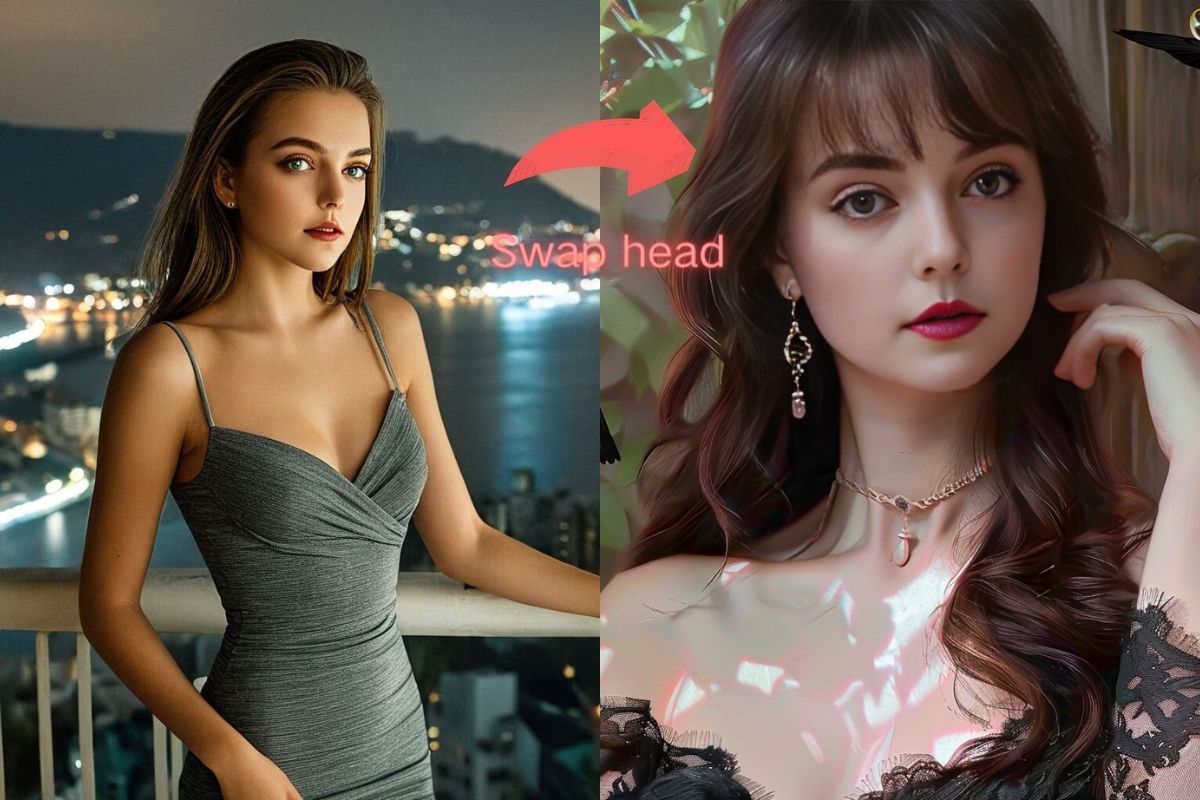
Full Head Replacement Result
Hair, ears, and facial features transferred as a single unit. Natural neck blending and lighting match.
Key Features of AI Head Swap
Why EZFaceSwap's head swap produces more complete, realistic results than basic face swap tools.
Full Head Replacement
Replaces the entire head — including scalp, hair, ears, and neck — rather than just the facial skin patch, producing a complete identity transfer in the output image.
Hair Included in Transfer
The AI segments hair strands individually, preserving your exact hairstyle, color, and length in the final composite. Curly, straight, long, or short hair all transfer accurately.
Natural Neck Blending
Advanced edge feathering and color correction at the neck and shoulder boundary makes the head-to-body transition look natural, eliminating the obvious cut lines seen in manual edits.
Multi-Angle Support
Works with front-facing, three-quarter, and moderate side-angle head positions. The AI adjusts perspective and scale to match the target body's pose and camera angle.
Accessory Preservation
Hats, headbands, glasses sitting on top of the head, and hair accessories are included in the head transfer, making costume and character head swaps look authentic.
Free & No Watermark
Full-resolution head swap output with no watermark added. No account creation or subscription required — completely free for personal and creative use.
Popular Uses for AI Head Swap
From cosplay to professional content, head swap has creative applications across many fields.
Cosplay & Costume Photos
Swap your head — with your wig or character hair — onto a high-quality costume reference photo. Perfect for showcasing a finished cosplay build or planning a future costume without a full photoshoot.
Historical Reenactment
Place your head onto period-accurate historical portraits for educational content, living history presentations, or social media storytelling. Hair styles from the era stay intact with head swap.
Character Casting Mockups
Game developers, novelists, and filmmakers use head swap to visualize casting choices — seeing how a real person's full head would look on a character's body without hiring a photographer.
Social Media Entertainment
Create viral content by placing your head on famous statues, action figures, movie posters, or historical paintings. The inclusion of your real hair makes these composites funnier and more recognizable.
Professional Headshots on Any Background
Take a casual selfie and use head swap to place your head — with your real hair perfectly preserved — onto a professional studio portrait background for LinkedIn, company directories, or press kits.
Gift & Personalized Print Products
Create personalized gifts by placing a loved one's full head (with their distinctive hair) onto funny or themed body templates. Print on mugs, posters, or greeting cards for birthdays and holidays.
AI Head Swap — Frequently Asked Questions
What is the difference between head swap and face swap?
Can AI head swap preserve the original hair color and style?
Does head swap work with different head angles?
What image types are supported for AI head swap?
Is AI head swap free to use?
Can I use head swap for cosplay photos?
Will the neck and shoulder area look natural after head swap?
How is AI head swap different from Photoshop manual editing?
Try AI Head Swap Free — No Sign-Up Needed
Upload two photos and get a complete head swap result in seconds. Full resolution, no watermark, completely free.
Want sharper, more accurate face swaps? Sign in for better results →